Выбор системы управления складом (WMS) — это не только вопрос функциональности.
Вам также необходимо решить, где будет работать система.
Для большинства компаний это означает выбор между:
Облачные системы управления складом (WMS)
и
Локальная система управления складом (WMS)
Обе системы поддерживают приемку, размещение на складе, инвентаризацию, комплектацию заказов, отгрузку, сканирование штрих-кодов, работу с портативными КПК и интеграцию с ERP-системами.
Разница заключается главным образом в способе размещения, обслуживания, доступа и управления системой.
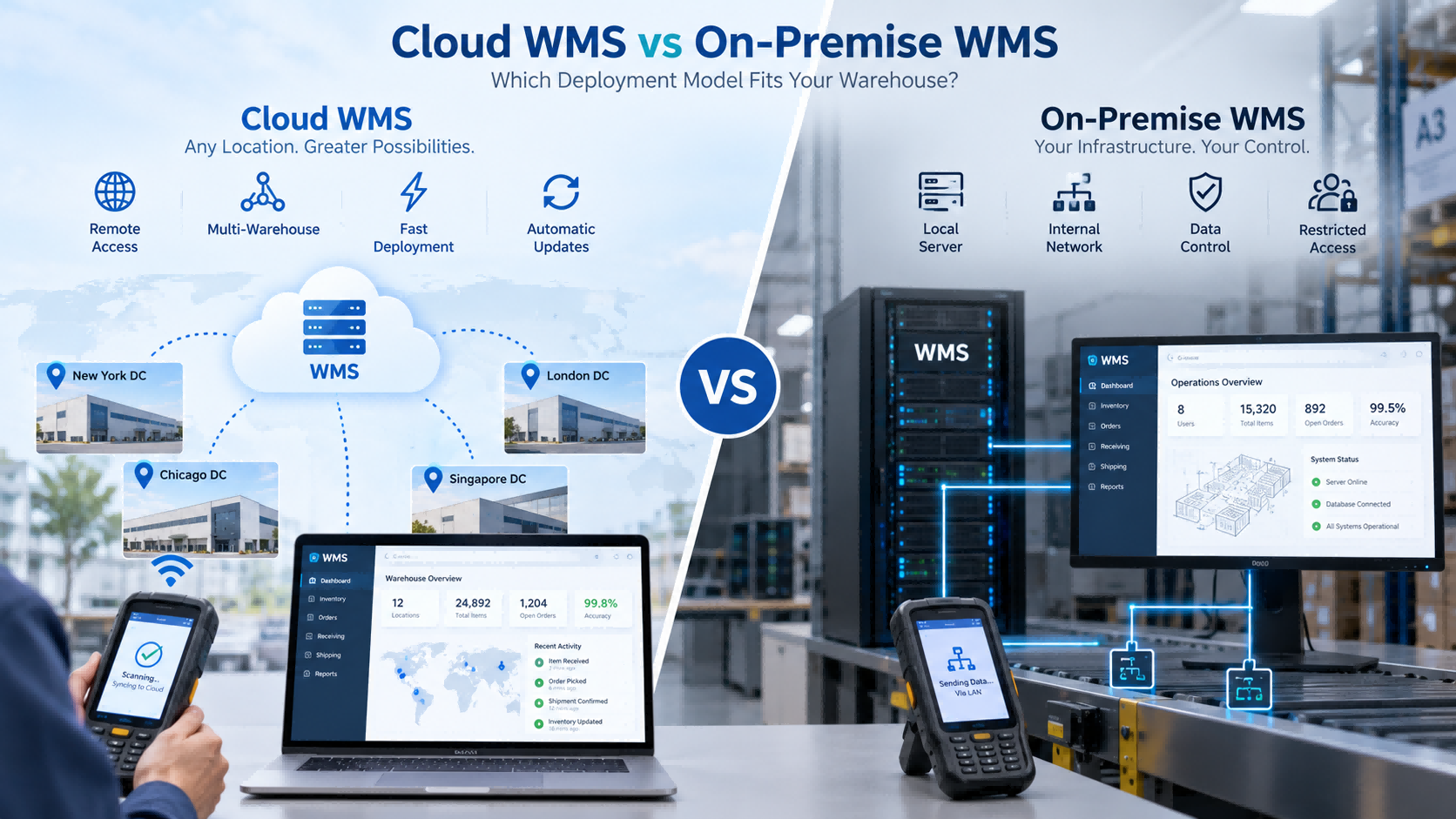
Быстрый ответ
При желании выберите облачную систему управления складом (Cloud WMS):
- более быстрое развертывание
- меньше локальной ИТ-инфраструктуры
- упрощенный доступ к нескольким сайтам
- более простые обновления
- упрощенная удаленная поддержка
Выберите локальную систему управления складом (WMS), если вам необходимо:
- развертывание внутренней сети
- локальное управление сервером
- ограниченный внешний доступ
- базы данных, управляемые компанией
- конкретные ИТ-политики или политики безопасности
Для многих небольших и средних складов облачные технологии — это простой способ начать работу.
Но если ваша ИТ-политика требует, чтобы система оставалась внутри вашей собственной сети, решение немедленно меняется.
Что такое облачная система управления складом (Cloud WMS)?
Облачная система управления складом (Cloud WMS) размещается на облачной инфраструктуре и обычно доступна через браузер или сетевое соединение.
Операторы склада могут по-прежнему использовать то же самое оборудование:
Разница заключается в том, где работает центральная система.
Типичная структура выглядит следующим образом:
КПК → Сеть → Облачная система управления складом (WMS)
Облачное развертывание часто выбирают компании, которые хотят ускорить внедрение, получить централизованный доступ и сократить затраты на обслуживание локальных серверов.
Что такое локальная система управления складом (WMS)?
Система управления складом (WMS), развернутая локально, работает внутри собственной ИТ-среды заказчика.
Типичная структура выглядит следующим образом:
КПК → Внутренняя сеть → Локальный сервер
Обычно это означает, что заказчик несет ответственность за большую часть инфраструктуры, включая:
- сервер
- база данных
- сеть
- резервные копии
- обслуживание системы
Этот вариант часто выбирают, когда система должна оставаться внутри внутренней сети или когда политика компании ограничивает внешний доступ.
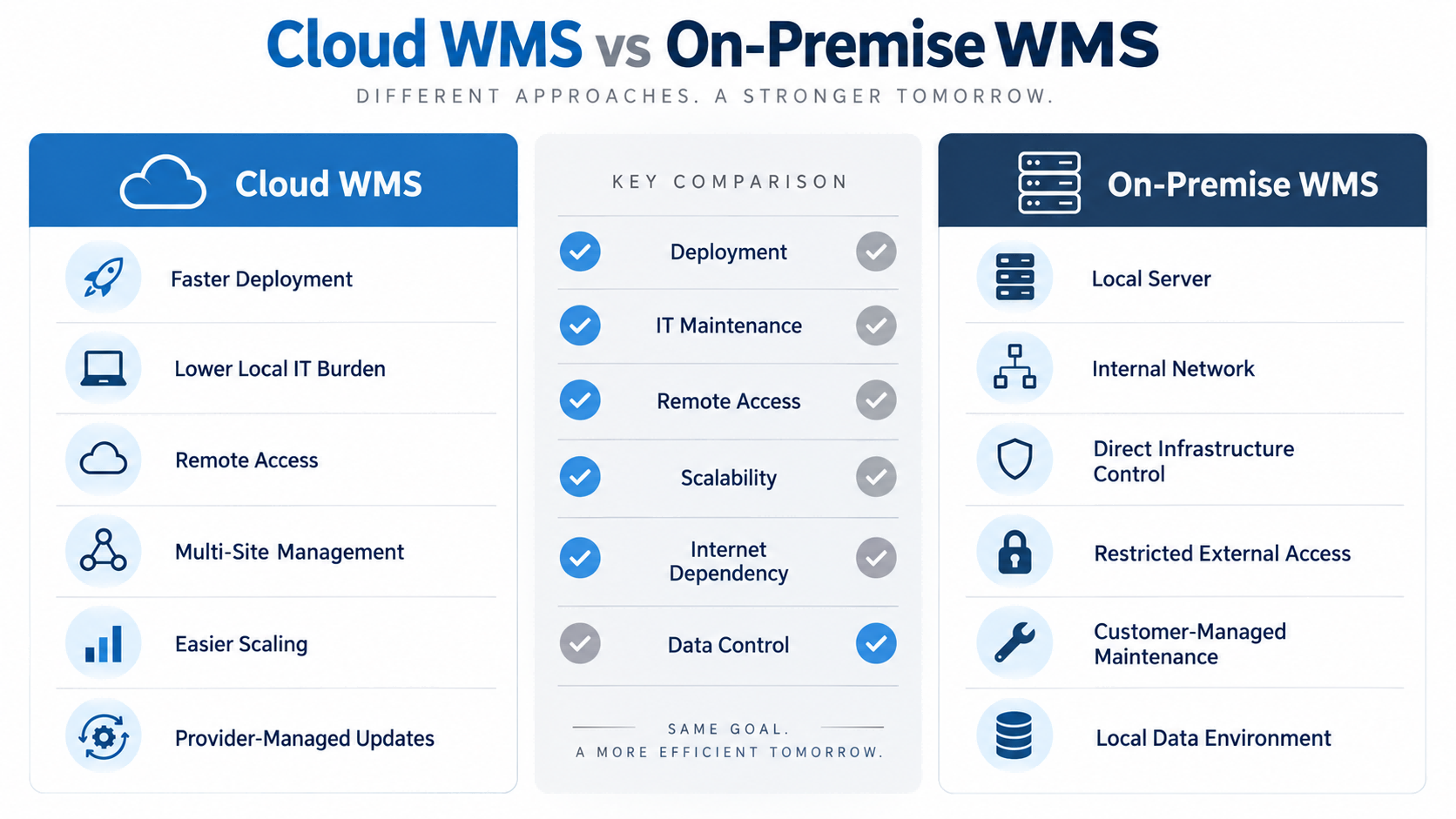
Облачная система управления складом (WMS) против локальной системы управления складом (WMS): основные различия.
| Фактор | Облачные системы управления складом (WMS) | Локальная система управления складом (WMS) |
| Развертывание | Обычно быстрее | Дополнительная подготовка инфраструктуры |
| Локальный сервер | Обычно не требуется | Обычно требуется |
| Техническое обслуживание ИТ | Снижение внутренней нагрузки | Больше внутренней ответственности |
| Многосайтовый доступ | Полегче | Зависит от архитектуры сети. |
| Удаленный доступ | Полегче | Требуется настройка |
| Обновления | Обычно управляется поставщиком услуг. | Обычно управляется клиентом. |
| Среда данных | Облачный хостинг | Контролируется заказчиком |
| Только для внутренней сети | В некоторых случаях менее подходит | Часто более подходящий |
| Масштабируемость | Проще расширять | Зависит от местной инфраструктуры. | |
Эта таблица дает краткий обзор, но окончательное решение обычно зависит от вашей ИТ-среды.
Стоимость, развертывание и техническое обслуживание
Облачные системы управления складом (WMS) обычно снижают необходимость создания локальной серверной инфраструктуры перед запуском.
Это может ускорить внедрение, особенно для небольших компаний, не имеющих собственной ИТ-команды.
Внедрение локальной инфраструктуры требует большей подготовки.
Организации может потребоваться выполнить следующие настройки:
- серверы
- базы данных
- сетевые разрешения
- политики резервного копирования
- внутренний доступ
Стоимость также рассчитывается по-разному.
Облачная система управления складом (WMS) обычно включает в себя подписку на программное обеспечение, пользователей, модули, внедрение и подключенное оборудование.
Внедрение локальной инфраструктуры может потребовать больших первоначальных затрат на создание инфраструктуры и постоянного внутреннего обслуживания.
Важный вопрос не сводится к простому:
Какой из них дешевле?
Более уместный вопрос:
Какая модель позволит снизить общую нагрузку на ИТ-инфраструктуру и затраты для нашей компании в ближайшие несколько лет?
Реальный опыт работы над проектом FYJ: облачная система управления складом для крупномасштабного интернет-магазина.
В рамках одного из проектов FYJ по созданию склада в Таиланде заказчик обрабатывал около 500 заказов в день и примерно 3000 наименований товаров.
В проекте использовалась облачная система управления складом (WMS) в сочетании с печатью и сканированием штрих-кодов, оповещениями о пополнении запасов, управлением запасами по методу ABC и медленно оборачиваемыми товарами, функциями работы с несколькими складами и мобильным комплектованием заказов.
После реализации:
- Точность учета запасов повысилась с 92% до 99,5%.
- Количество ошибок при отгрузке снизилось с 3% до 0,5%.
- Расстояние, которое можно пройти пешком до склада, сократилось примерно на 40%.
- Оборачиваемость запасов улучшилась с 75 до 45 дней.
- Ежедневное закрытие могло быть завершено менее чем за 10 минут.
Для такого рода операций развертывание в облаке было целесообразным, поскольку складу требовался централизованный, мобильный доступ к данным из нескольких складов без необходимости создания более сложной локальной серверной среды.
Многоскладское хранение и удаленный доступ
Именно здесь облачные системы управления складом (Cloud WMS) часто обладают практическим преимуществом.
Если компания управляет несколькими складами, развертывание в облаке упрощает использование одной и той же платформы как головным офисом, так и различными филиалами.
Руководство может просматривать:
- наличие товаров на складе
- трансферы
- входящий статус
- исходящий статус
- изменения в инвентаризации
без поддержания отдельных локальных систем.
В локальной среде также может поддерживаться несколько складов, но компании обычно требуется более тщательное планирование внутренней сети между площадками.
Для одного склада эта разница может не иметь большого значения.
При наличии пяти или десяти локаций это становится гораздо важнее.
Что произойдёт, если отключится интернет?
Это один из самых практических вопросов, которые должны задавать покупатели.
Облачная система управления складом (WMS) в большей степени зависит от сетевого подключения.
Прежде чем сделать выбор, спросите:
- Может ли КПК работать в автономном режиме?
- Можно ли временно сохранять данные транзакций?
- Что произойдет во время приема, если сеть выйдет из строя?
- Что происходит во время сбора урожая?
- Как происходит синхронизация данных после переподключения?
Для складов с нестабильным интернетом это может быть важнее многих функций программного обеспечения.
В зависимости от архитектуры, локальные системы часто могут продолжать работать внутри локальной сети.
Когда локальное развертывание становится очевидным выбором
В некоторых проектах FYJ модель развертывания определяется еще до обсуждения функций программного обеспечения.
Если требования заказчика включают в себя:
- только внутренняя сеть
- локальный сервер
- ограниченный внешний доступ
- контролируемая компанией база данных
- строгая политика в области информационных технологий
В таком случае развертывание в облаке может оказаться уже неподходящим.
Программное обеспечение FYJ поддерживает как облачное развертывание, так и локальное/частное развертывание, что позволяет выбирать архитектуру в соответствии с ИТ-средой заказчика.
Это важный момент:
Не следует выбирать развертывание на собственных серверах только потому, что это «звучит более безопасно».
Его следует выбирать в тех случаях, когда локальный контроль действительно необходим.
Интеграция с ERP-системами: возможна как облачная, так и локальная интеграция.
Интеграция ERP-систем определяется не только моделью развертывания.
Как облачные, так и локальные системы управления складом (WMS) могут интегрироваться с ERP-системами, если эти системы предоставляют соответствующие интерфейсы.
Перед внедрением определите:
- Где создаются артикулы товаров (SKU)?
- Где создаются заказы на закупку?
- Где создаются заказы на продажу?
- Какая система владеет товарными запасами?
- Как происходит синхронизация корректировок?
- Требуется ли синхронизация в реальном времени?
Если эти вопросы не будут ясны, сотрудники могут в итоге ввести одну и ту же транзакцию дважды.
Это сводит на нет одну из главных причин внедрения WMS.
Влияет ли развертывание на аппаратное обеспечение хранилища данных?
Обычно немного.
Обе модели могут использовать:
- портативный КПК
- сканер штрихкодов
- принтер штрихкодов
- Портативный RFID-считыватель
- стационарный RFID-считыватель
- RFID-принтер
- штрихкоды или RFID-метки
Оператор склада может выполнить точно такое же действие:
Сканировать товар → Место сканирования → Подтвердить количество
Меняется лишь то, куда поступают данные.
Облако
КПК → Сеть → Облачная система управления складом (WMS)
На территории предприятия
КПК → Внутренняя сеть → Локальный сервер
Таким образом, выбор между облачным и локальным развертыванием — это в основном вопрос архитектуры программного обеспечения, а не аппаратного обеспечения хранилища данных.
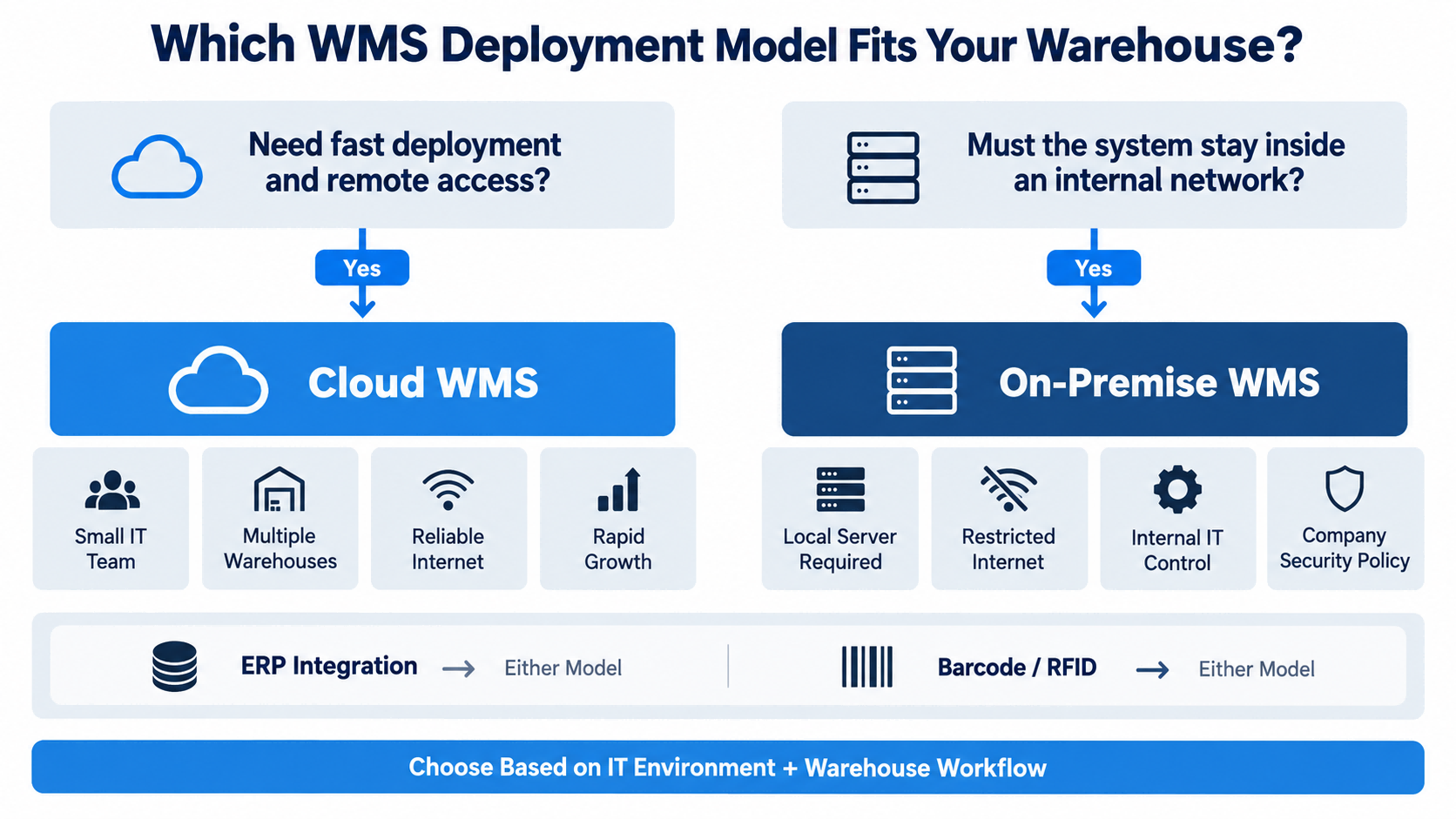
Какая модель подходит для вашего склада?
Выбирайте облачную систему управления складом (Cloud WMS), когда:
- вам нужна более быстрая развертка
- Ваша ИТ-команда небольшая.
- У вас несколько складов.
- удаленный доступ важен
- Ваше интернет-соединение надежное.
- вы ожидаете роста масштабов деятельности компании
Выбирайте локальную систему управления складом (WMS), если:
- Склад должен функционировать внутри внутренней сети.
- Внешний доступ ограничен.
- Компании требуются локальные серверы.
- ИТ-специалисты хотят иметь прямой контроль над инфраструктурой.
- Согласно политике компании, требуется локальное развертывание.
Если технически возможны обе модели, сравните общую стоимость, нагрузку на ИТ-инфраструктуру, масштабируемость и потребности в будущей интеграции.
Матрица принятия решений по развертыванию WMS
| Ваша ситуация | Лучшая отправная точка |
| Небольшая ИТ-команда | Облачные системы управления складом (WMS) |
| Необходимо быстрое внедрение. | Облачные системы управления складом (WMS) |
| Несколько складских помещений | Облачные системы управления складом (WMS) |
| Требуется удаленный доступ | Облачные системы управления складом (WMS) |
| Ожидается быстрое расширение. | Облачные системы управления складом (WMS) |
| Только внутренняя сеть | На территории предприятия |
| Требуется локальный сервер | На территории предприятия |
| Внешний доступ в интернет ограничен | На территории предприятия |
| Компания контролирует ИТ-инфраструктуру | Для размещения на территории предприятия может подойти |
| Требуется интеграция с ERP-системой. | Или |
| Требуется штрихкод или RFID-метка. | Или |
| Интернет нестабилен. Оценивать | Возможность установки на месте или в автономном режиме. |
Вопросы, которые следует задать поставщику WMS
Прежде чем принять решение, задайте себе следующие вопросы:
- Вы поддерживаете облачные, локальные или оба варианта?
- Где будут храниться наши данные?
- Кто занимается резервным копированием?
- Кто занимается обновлениями?
- Что произойдет, если интернет выйдет из строя?
- Могут ли портативные КПК работать в автономном режиме?
- Может ли несколько складов использовать одну и ту же систему?
- Может ли система управления складом (WMS) интегрироваться с нашей ERP-системой?
- Какая ИТ-инфраструктура необходима?
- Может ли модель развертывания измениться в дальнейшем?
Если поставщик не может дать четких ответов на эти вопросы, вероятно, архитектура развертывания еще не полностью определена.
Как FYJ подходит к развертыванию WMS
FYJ поддерживает как облачное, так и локальное развертывание системы управления складом.
Выбор обычно начинается с нескольких практических вопросов:
- Сколько складов задействовано?
- Необходим ли удалённый доступ в головной офис?
- Насколько надёжен интернет?
- Есть ли у клиента собственная ИТ-команда?
- Требуется ли локальное развертывание?
- Нужна ли системе WMS интеграция с ERP-системой?
- Будут ли операторы использовать портативные КПК?
- Будет ли достаточно штрихкода, или потребуется RFID?
Модель развертывания выбирается после того, как эти требования станут ясны.
На практике мы не рекомендуем облачные или локальные решения только потому, что одно из них новее.
Система должна соответствовать как рабочим процессам склада, так и ИТ-среде клиента.
Часто задаваемые вопросы
Облачная система управления складом (Cloud WMS) лучше, чем локальная система управления складом (On-Premise WMS)
Не всегда. Облачные системы управления складом (WMS) часто проще развертывать и обслуживать. Локальные решения больше подходят, когда требуется управление внутренней сетью или локальным сервером.
Облачные системы управления складом (Cloud WMS) дешевле?
Это может снизить первоначальные затраты на инфраструктуру, но общая стоимость по-прежнему зависит от подписок, пользователей, интеграции, оборудования и долгосрочной эксплуатации.
Требуется ли для работы Cloud WMS доступ к интернету?
Обычно да. Уточните, поддерживает ли система или КПК работу в автономном режиме при прерывании подключения.
Является ли локальная система управления складом более безопасной?
Не автоматически. Это дает клиенту более прямой контроль над локальной средой, но реальная безопасность зависит от проектирования системы, контроля доступа, технического обслуживания и управления ИТ.
Обе модели могут быть интегрированы с ERP-системой?
Да, если доступны подходящие API или методы интеграции.
Могут ли облачные и локальные системы управления складом поддерживать как штрих-коды, так и RFID-метки?
Да. Штрих-коды и RFID — это технологии сбора данных, и их можно использовать с любой из этих моделей развертывания, если это поддерживается программным обеспечением.
Заключение
Как облачные, так и локальные системы управления складом (WMS) могут эффективно поддерживать работу склада.
Для многих растущих складов облачная система управления складом (Cloud WMS) проще в развертывании и масштабировании.
Для организаций с контролируемыми внутренними сетями или строгими требованиями к локальной инфраструктуре более практичным выбором может оказаться развертывание на собственных серверах.
Ключевой вопрос не в следующем:
Какая модель лучше?
Это:
Какая модель лучше всего подходит для нашей ИТ-среды, рабочих процессов на складе и будущего роста?
Именно это решение должно стать определяющим в проекте WMS.

 ru
ru 





 Поддерживается сеть IPv6